Enabling timezone selection on documents
The timezone picker overrides the query timezone for a single document without changing your profile settings. When enabled, a timezone menu appears in the document header and dashboard footer so you and your viewers can switch the timezone used for all queries in the document. You can also apply timezone overrides to deliveries and downloads.
Enabling the timezone picker
Section titled “Enabling the timezone picker”To use the timezone picker, enable all the following settings:
-
Enable the User-specific Timezones connection setting
Your admin must enable the underlying connection’s User-specific Timezones setting.
-
Enable the Timezone override organization setting
Your admin must enable the Timezone override default document ability.
-
Enable the Timezone override document setting
A user with Editor, Manager, or Owner permissions on the document must enable the document’s Timezone override setting. See Dashboard settings for more information.
Using the timezone picker
Section titled “Using the timezone picker”When all three settings are enabled, the timezone picker displays in the document’s header and the footer of the dashboard:
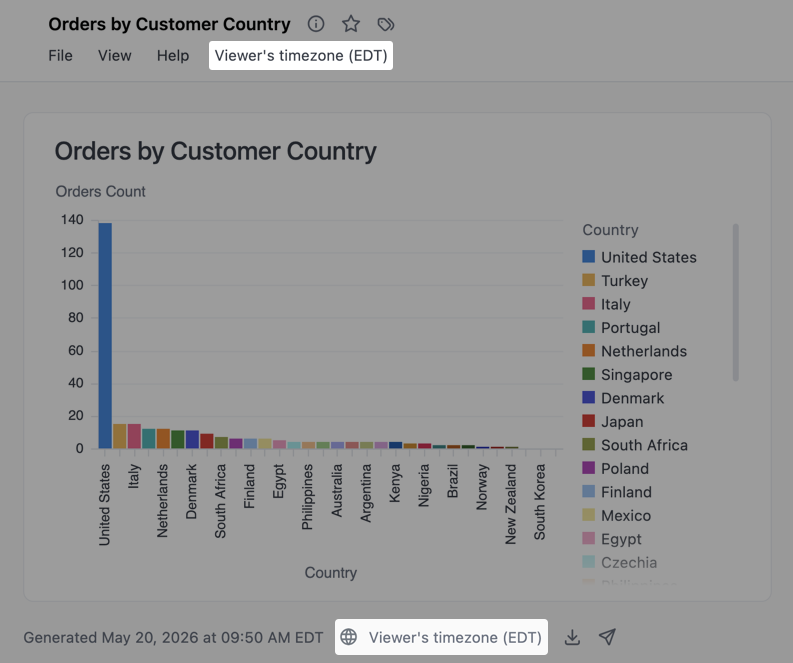
Use the picker to select one of the following:
- Viewer’s timezone - Each viewer’s profile timezone
- UTC - Coordinated Universal Time
- A specific timezone - For example,
America/Denver
Your selection persists when navigating between the dashboard and workbook in the document, ensuring a consistent timezone experience as you move between viewing and editing your analysis.
Next steps
Section titled “Next steps”- Configure interactivity for your documents in dashboard settings