Smart aggregation
A query can have more dimensions than a layer uses. For example, a query has Created At Month, Status, Order Items Count, and Products Count. One layer plots Order Items Count colored by Status. Another layer plots Products Count as one line, without Status.
The Products Count layer needs one value for each month, but the query returns one row for each month and status. Smart aggregation gets the correct value for each month by adding totals to your query.
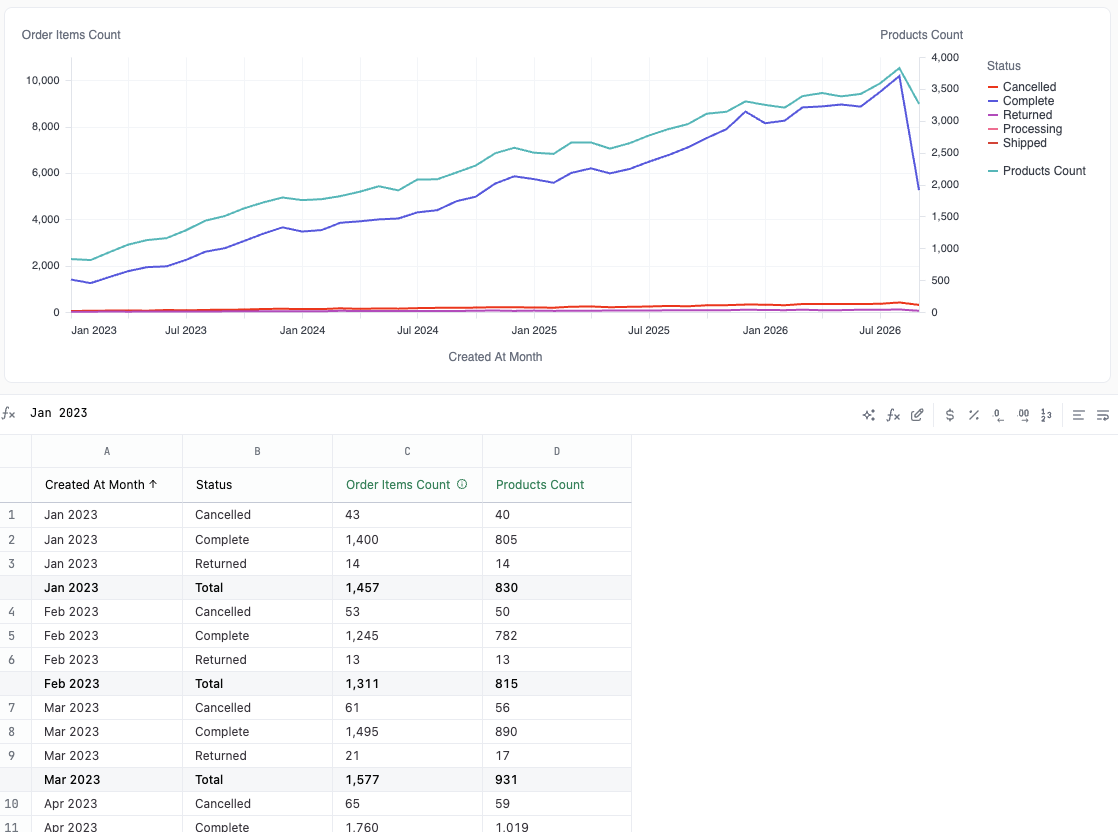
How smart aggregation works
Section titled “How smart aggregation works”When a layer doesn’t use every dimension in the query, JustAsk changes the query to get the totals that the layer needs:
- JustAsk adds totals or subtotals to the query. The layer plots the total rows. The layers that use every dimension plot the other rows.
- To get the correct totals, JustAsk can change the order of the grouped dimensions in the results table.
The totals come from your database. JustAsk doesn’t add or average values in the browser, because a total calculated from rows in the browser can be wrong. For example, a count of distinct products isn’t the sum of the counts for each status.
What to expect
Section titled “What to expect”- The query changes. You see the added total rows and the new dimension order in the results table.
- JustAsk adds only the totals that it needs. If you remove totals from the query, JustAsk doesn’t add them again unless a change to the chart or the query needs them.
- Some layers can’t get totals. When JustAsk can’t produce the totals it needs, the layer plots every row of the query. A line layer then looks jagged, because it has one point for each value of the unused dimension. This happens with:
- Two layers that each leave out a different dimension. For example, one layer is colored by
Countryand another layer is colored byGender. JustAsk can get totals acrossGenderfor the first layer or acrossCountryfor the second layer, but not both. One of the layers looks jagged. - A dimension order that you set by hand in the results table
- A pivot whose order would need to change
- A Measure values layer
- Fields that aren’t numbers
- Two layers that each leave out a different dimension. For example, one layer is colored by
- Layers can look jagged for a moment while the query runs again with the new totals.
Troubleshooting
Section titled “Troubleshooting”A line layer zigzags up and down
The layer is plotting one point for each value of a dimension that it doesn’t use. Check the results table for total rows. If there are none, try one of these options:
- Add the dimension to the layer, for example as its Color.
- Remove the dimension from the query.
- Change the dimension order in the results table back to the order that JustAsk set.
Only one of my layers gets totals
Each layer leaves out a different dimension, and the query can get totals across only one of them. For example, the Order Items Count layer is colored by Country, and the Users Count layer is colored by Gender. To get totals for both layers, pivot one of the two dimensions in the results table.
My query has totals that I didn't add
Smart aggregation added them for a layer that doesn’t use every dimension. To remove them, give every layer the same dimensions, or remove the dimension that the layer doesn’t use from the query.